Configure the connector
The connector publishes your open Yape orders to the platform and collects matches. It only makes outbound calls: it opens no new endpoint in your store, except the optional webhook notice.
Where: Stores → Configuration → Sales → Yape Connector. Switch the Scope to your store’s website.
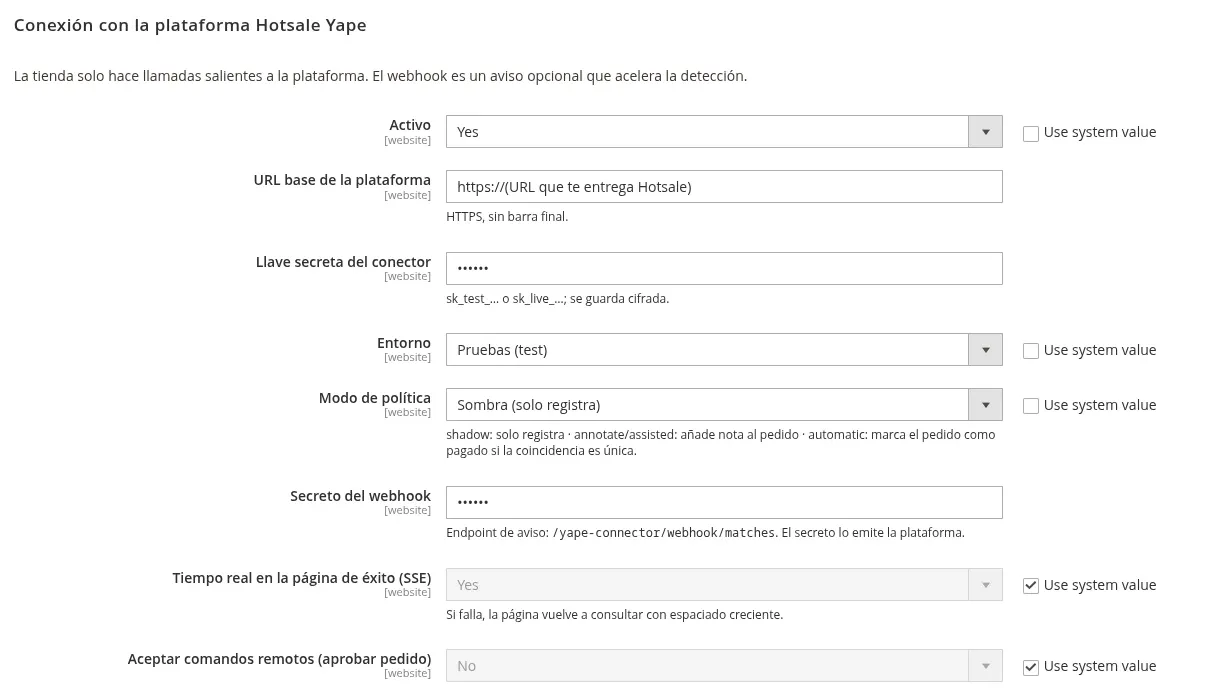
Fields
Section titled “Fields”| Field | What to enter | Where it comes from |
|---|---|---|
| Activo (Enabled) | Yes | — |
| URL base de la plataforma | The URL Hotsale gives you, HTTPS, no trailing slash | Hotsale |
| Llave secreta del conector | sk_test_… for testing or sk_live_… for production. Stored encrypted |
Panel → API keys |
| Entorno (Environment) | Pruebas (test) or Producción (live). Must match the key | — |
| Modo de política (Policy mode) | Start on Shadow (Sombra) | Policy modes |
| Secreto del webhook | Optional. Speeds up detection with an instant notice | Panel → Webhooks |
| Real time on the success page (SSE) | Yes (default). If it fails, the page polls on its own | — |
| Accept remote commands | No (default). If enabled, the panel can request “approve order”; Magento validates it against your policy | — |
| Share customer and products with the app | No (default). If enabled, the app shows customer name, products and totals in the payment detail. Email, phone, ID and address are never sent | — |
Webhook (optional)
Section titled “Webhook (optional)”- In the panel, open Webhooks and register your store URL ending in
/yape-connector/webhook/matches. - Copy the secret the panel shows (only shown once).
- Paste it into Secreto del webhook in Magento and save.
Without a webhook everything still works: cron collects matches every minute.
Check it works
Section titled “Check it works”- Save the configuration and wait a minute or two (cron runs every minute).
- In the panel, check My store → Connection with Magento.
- Place a test order with Yape: it should show up on the platform as an open order.
Next: link the phone.